
डोमेन नाम क्या है? (Domain Name in Hindi) – प्रकार, काम करने का तरीका और खरीदने की पूरी जानकारी
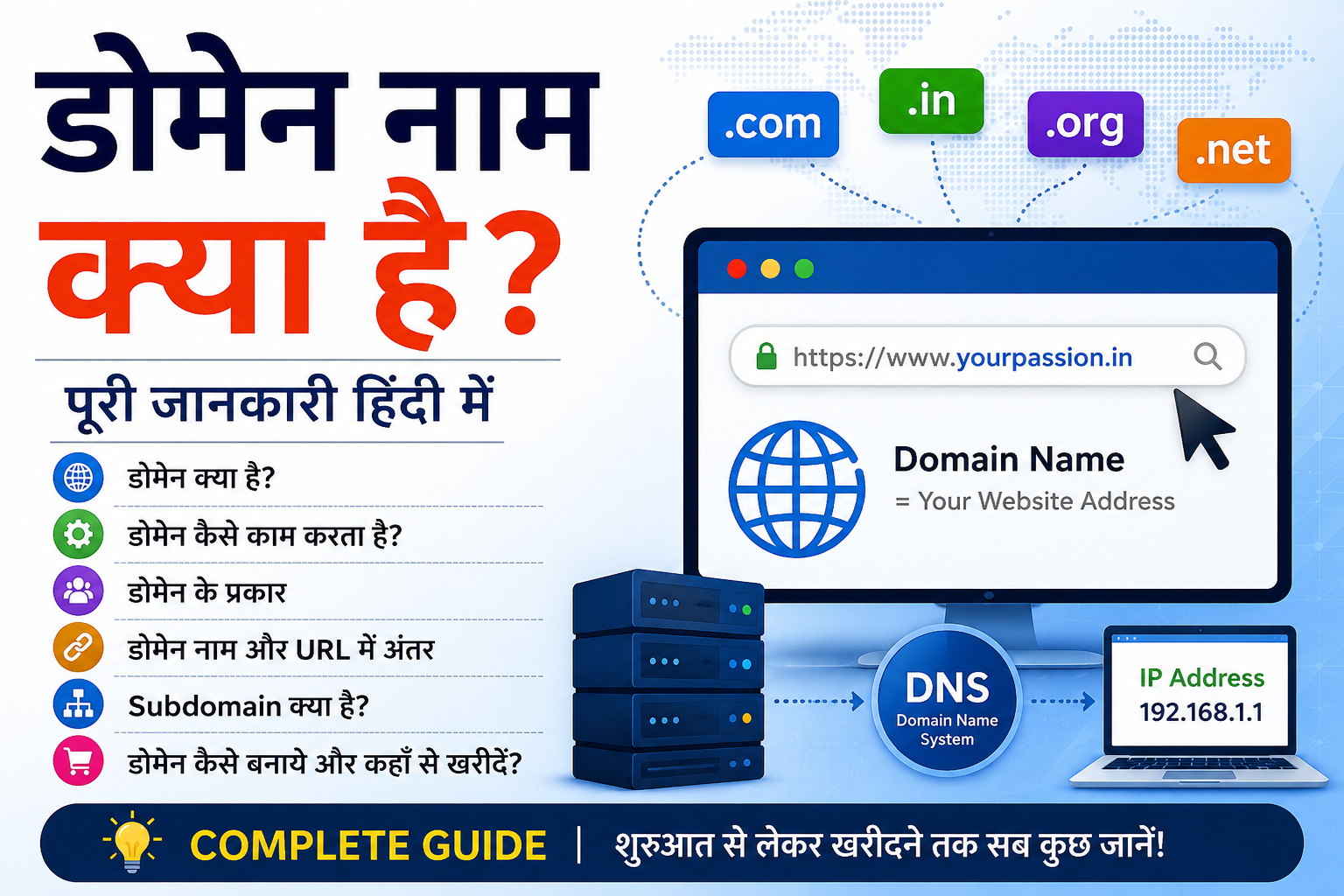
यदि आप वेबसाइट बनाना चाहते हैं या इंटरनेट की दुनिया को समझना चाहते हैं, तो सबसे पहले आपको डोमेन नाम (Domain Name) के बारे में जानना चाहिए। इंटरनेट पर मौजूद हर वेबसाइट की एक पहचान होती है, जिसे डोमेन नाम कहा जाता है।
उदाहरण के लिए:
google.com
facebook.com
yourpassion.in
palamsolutions.com
ये सभी डोमेन नाम हैं।
सरल शब्दों में, डोमेन नाम किसी वेबसाइट का पता (Address) होता है, जिसकी मदद से लोग इंटरनेट पर उस वेबसाइट तक पहुंच सकते हैं। जैसे आपके घर का एक पता होता है, उसी तरह वेबसाइट का भी एक पता होता है जिसे Domain Name कहा जाता है।
इस लेख में हम जानेंगे:
✅ डोमेन नाम क्या होता है
✅ डोमेन कैसे काम करता है
✅ डोमेन के प्रकार
✅ Domain और URL में अंतर
✅ Subdomain क्या होता है
✅ Domain कैसे बनाएं
✅ Domain कहाँ से खरीदें
यदि आप Blogging, Web Development, SEO या Online Business शुरू करना चाहते हैं, तो यह जानकारी आपके लिए बेहद उपयोगी होगी।
Table of Contents
Toggleडोमेन काम कैसे करता है? – How Does Domain Work in Hindi
जब आप किसी वेबसाइट का Domain Name Browser में टाइप करते हैं, तो आपके Browser को यह पता नहीं होता कि वेबसाइट वास्तव में किस Server पर मौजूद है। इसलिए Domain Name System (DNS) की मदद ली जाती है।
DNS इंटरनेट की Phonebook की तरह काम करता है, जो Domain Name को उसके संबंधित IP Address में बदल देता है।
डोमेन कैसे काम करता है?
मान लीजिए आप Browser में लिखते हैं:
https://yourpassion.in
तब Background में निम्न प्रक्रिया होती है:
User
  ↓
Browser
  ↓
DNS Lookup
  ↓
IP Address
  ↓
Web Server
  ↓
Website Load
Step 1: User Domain Name Enter करता है
सबसे पहले User Browser में Website का Domain Name लिखता है।
उदाहरण:
yourpassion.in
Step 2: Browser DNS Query भेजता है
Browser DNS Server से पूछता है:
“yourpassion.in किस IP Address पर मौजूद है?”
Step 3: DNS IP Address लौटाता है
DNS Server Domain Name को IP Address में बदल देता है।
उदाहरण:
yourpassion.in
      ↓
104.xxx.xxx.xxx
Step 4: Browser Server से जुड़ता है
IP Address मिलने के बाद Browser उस Web Server से Connection बनाता है।
यदि Website HTTPS का उपयोग करती है, तो SSL/TLS Connection भी स्थापित किया जाता है।
Step 5: HTTP Request भेजी जाती है
Browser Server को Request भेजता है:
GET /
मतलब Browser Home Page मांग रहा है।
Step 6: Server Response भेजता है
Server Website की Files:
HTML
CSS
JavaScript
Images
Browser को भेजता है।
Step 7: Website Browser में दिखाई देती है
Browser प्राप्त Data को Process करता है और User को Website दिखा देता है।
DNS क्या भूमिका निभाता है?
DNS के बिना Internet का उपयोग करना बहुत कठिन हो जाएगा।
उदाहरण:
❌ 104.xxx.xxx.xxx
✅ yourpassion.in
स्पष्ट रूप से Domain Name याद रखना आसान है।
Domain और Hosting का संबंध
बहुत से Beginners Domain और Hosting को एक ही चीज समझ लेते हैं।
Domain
Website का Address
उदाहरण:
yourpassion.in
Hosting
Website की Files Store करने की जगह
उदाहरण:
HTML Files
Images
Videos
Database
आसान उदाहरण
यदि Website एक घर है:
🏠 Hosting = घर
📍 Domain = घर का पता
Nameservers क्या होते हैं?
Nameservers DNS को बताते हैं कि Domain किस Hosting Server से जुड़ा है।
उदाहरण:
ns1.hostingcompany.com
ns2.hostingcompany.com
जब आप Domain को Hosting से जोड़ते हैं, तो Nameservers का उपयोग किया जाता है।
Domain Resolution Process
पूरी प्रक्रिया:
Domain Name
      ↓
DNS Server
      ↓
IP Address
      ↓
Web Server
      ↓
Website Open
Domain Load होने में कितना समय लगता है?
आधुनिक DNS Systems के कारण यह प्रक्रिया आमतौर पर कुछ Milliseconds में पूरी हो जाती है।
इसलिए Websites लगभग तुरंत खुल जाती हैं।
Domain काम करने के लिए क्या जरूरी है?
✅ Registered Domain Name
✅ DNS Records
✅ Nameservers
✅ Web Hosting
✅ Active Web Server
💡 याद रखें: Domain Name DNS की मदद से IP Address में बदलता है और फिर Browser उस Server से जुड़कर Website को प्रदर्शित करता है।
👉 अगला सेक्शन: डोमेन कितने प्रकार के होते हैं? (Types of Domain Names)
डोमेन कितने प्रकार के होते हैं? – What are the Types of Domains in Hindi
इंटरनेट पर लाखों Domain Names मौजूद हैं, लेकिन सभी Domains एक जैसे नहीं होते। उनके Extension और उपयोग के आधार पर Domains को कई प्रकारों में बांटा जाता है।
यदि आप Website या Blog शुरू करने की योजना बना रहे हैं, तो Domain Types को समझना आपके लिए महत्वपूर्ण है।
1. Top Level Domain (TLD)
Top Level Domain या TLD किसी Domain Name का अंतिम भाग होता है।
उदाहरण:
google.com
यहाँ:
.com
Top Level Domain (TLD) है।
लोकप्रिय TLDs
| TLD | उपयोग |
|---|---|
| .com | Commercial Websites |
| .org | Organizations |
| .net | Network Related Websites |
| .edu | Educational Institutions |
| .gov | Government Websites |
.com सबसे लोकप्रिय क्यों है?
क्योंकि:
✅ याद रखना आसान
✅ Global Recognition
✅ Business Websites के लिए उपयुक्त
2. Country Code Top Level Domain (ccTLD)
Country Specific Domains को ccTLD कहा जाता है।
इनका उपयोग किसी विशेष देश को Target करने के लिए किया जाता है।
उदाहरण
| Country | Extension |
|---|---|
| India | .in |
| United Kingdom | .uk |
| Australia | .au |
| Canada | .ca |
| Germany | .de |
उदाहरण
yourpassion.in
यह India Targeting Domain है।
ccTLD के फायदे
✅ Local SEO में मदद
✅ Country-Specific Branding
✅ Local Audience Trust
3. Generic Top Level Domain (gTLD)
gTLD ऐसे Domains होते हैं जो किसी विशेष देश तक सीमित नहीं होते।
उदाहरण:
.com
.net
.org
.info
.biz
उपयोग
🌐 Global Websites
🛒 Ecommerce Stores
🏢 Businesses
📱 SaaS Platforms
4. New gTLDs
हाल के वर्षों में कई नए Domain Extensions उपलब्ध हुए हैं।
उदाहरण:
.shop
.online
.store
.tech
.blog
.app
उदाहरण
mybusiness.shop
या
startup.tech
5. Second Level Domain (SLD)
Domain Name का मुख्य भाग Second Level Domain कहलाता है।
उदाहरण:
yourpassion.in
यहाँ:
yourpassion
Second Level Domain है।
Structure
yourpassion.in
      ↑
      SLD
6. Third Level Domain
जब Domain के पहले कोई अतिरिक्त भाग जोड़ा जाता है, तो उसे Third Level Domain कहा जा सकता है।
उदाहरण:
blog.example.com
यहाँ:
blog
Third Level Domain है।
Domain Structure को समझें
उदाहरण:
blog.yourpassion.in
Breakdown
| Part | Meaning |
|---|---|
| blog | Subdomain |
| yourpassion | Domain Name |
| .in | TLD |
SEO के लिए कौन सा Domain बेहतर है?
अधिकांश मामलों में:
✅ .com
या
✅ Country Specific Domain (.in)
अच्छे विकल्प माने जाते हैं।
India Target करने पर
.in
फायदेमंद हो सकता है।
Global Audience के लिए
.com
सबसे लोकप्रिय विकल्प है।
Domain Types Summary
| Type | Example |
|---|---|
| TLD | .com |
| ccTLD | .in |
| gTLD | .org |
| New gTLD | .tech |
| SLD | |
| Third Level Domain | blog.google.com |
Domain चुनते समय ध्यान रखें
✅ छोटा और याद रखने योग्य हो
✅ Brand Name से मेल खाता हो
✅ Spell करना आसान हो
✅ SEO Friendly हो
✅ भविष्य में Brand Growth को Support करे
💡 याद रखें: .com सबसे लोकप्रिय TLD है, जबकि .in जैसे ccTLD किसी विशेष देश को Target करने के लिए उपयोग किए जाते हैं।
👉 अगला सेक्शन: क्या Domain Name और URL एक ही चीज हैं? (Domain Name vs URL)
क्या डोमेन नाम और यूआरएल एक है? – Is the Domain Name and URL the Same
बहुत से लोग Domain Name और URL को एक ही चीज समझते हैं, लेकिन वास्तव में दोनों अलग-अलग होते हैं। Domain Name, URL का केवल एक हिस्सा होता है।
यदि आप Website, SEO या Web Development सीख रहे हैं, तो इन दोनों के बीच का अंतर समझना जरूरी है।
Domain Name क्या होता है?
Domain Name किसी Website का नाम या पता होता है।
उदाहरण:
google.com
yourpassion.in
palamsolutions.com
ये सभी Domain Names हैं।
URL क्या होता है?
URL का पूरा नाम Uniform Resource Locator है।
URL किसी Web Resource का पूरा Address होता है।
उदाहरण:
https://yourpassion.in/blog/domain-name-kya-hai/
यह एक पूर्ण URL है।
URL के भाग (Parts of URL)
उदाहरण:
https://yourpassion.in/blog/domain-name-kya-hai/
Breakdown
| Part | Meaning |
|---|---|
| https:// | Protocol |
| yourpassion.in | Domain Name |
| /blog/ | Directory |
| domain-name-kya-hai | Page URL Slug |
Domain Name और URL में अंतर
Domain Name
yourpassion.in
यह केवल Website का नाम है।
URL
https://yourpassion.in/blog/domain-name-kya-hai/
यह किसी विशेष Page का पूरा Address है।
आसान उदाहरण
मान लीजिए आपका घर है।
Domain Name
📍 कॉलोनी का नाम
URL
📍 पूरा पता
घर नंबर + गली + कॉलोनी + शहर
एक Website में कई URLs हो सकते हैं
उदाहरण:
Domain:
yourpassion.in
URLs:
https://yourpassion.in/
https://yourpassion.in/blog/
https://yourpassion.in/contact-us/
हमारे बारे में (About Us)
सभी URLs एक ही Domain का उपयोग कर रहे हैं।
SEO में URL क्यों महत्वपूर्ण है?
Search Engines URL Structure को भी देखते हैं।
SEO Friendly URL:
https://yourpassion.in/domain-name-kya-hai/
कम SEO Friendly URL:
https://yourpassion.in/page?id=12345
Domain Name और URL का संबंध
सरल भाषा में:
URL = Protocol + Domain Name + Path
उदाहरण:
https://yourpassion.in/blog/
यहाँ:
HTTPS = Protocol
yourpassion.in = Domain
/blog/ = Path
क्या बिना Domain के URL हो सकता है?
सामान्य Website Browsing में नहीं।
क्योंकि URL का मुख्य भाग Domain Name ही होता है।
क्या एक Domain पर कई URLs हो सकते हैं?
हाँ।
एक Domain पर हजारों Pages और URLs हो सकते हैं।
उदाहरण:
yourpassion.in
इसके अंतर्गत:
Home Page
Blog Pages
Category Pages
Product Pages
Contact Page
सबके अलग-अलग URLs हो सकते हैं।
Quick Comparison
| Feature | Domain Name | URL |
|---|---|---|
| Purpose | Website Name | Complete Web Address |
| Example | google.com | https://google.com/search |
| Includes Protocol | No | Yes |
| Includes Path | No | Yes |
| SEO Importance | High | High |
💡 याद रखें: Domain Name Website का नाम है, जबकि URL किसी Web Page का पूरा पता (Complete Address) होता है।
👉 अगला सेक्शन: Subdomain Name क्या है? (What is Subdomain in Hindi)
Subdomain Name क्या है? – What is Subdomain Name in Hindi
Subdomain, मुख्य Domain Name का एक हिस्सा होता है जिसका उपयोग Website के किसी विशेष सेक्शन, Service या Area को अलग पहचान देने के लिए किया जाता है।
सरल भाषा में:
Subdomain, Domain Name के पहले जोड़ा गया अतिरिक्त नाम होता है।
उदाहरण:
blog.yourpassion.in
यहाँ:
blog = Subdomain
yourpassion = Domain Name
.in = Domain Extension
Subdomain का उदाहरण
मान लीजिए आपका मुख्य Domain है:
yourpassion.in
अब आप अलग-अलग Sections के लिए Subdomains बना सकते हैं:
blog.yourpassion.in
shop.yourpassion.in
support.yourpassion.in
mail.yourpassion.in
Subdomain की आवश्यकता क्यों होती है?
Subdomains का उपयोग Website के अलग-अलग हिस्सों को व्यवस्थित करने के लिए किया जाता है।
उदाहरण:
Blog Section
blog.example.com
Online Store
shop.example.com
Customer Support
support.example.com
Webmail
mail.example.com
Subdomain कैसे दिखता है?
Domain Structure:
subdomain.domain.extension
उदाहरण:
blog.yourpassion.in
यहाँ:
| Part | Meaning |
|---|---|
| blog | Subdomain |
| yourpassion | Main Domain |
| .in | TLD |
WWW भी एक Subdomain है
कई लोग नहीं जानते कि:
www.google.com
में:
www
भी एक Subdomain माना जाता है।
Subdomain और Subdirectory में अंतर
Subdomain
blog.yourpassion.in
Subdirectory
yourpassion.in/blog/
SEO के दृष्टिकोण से अंतर
Search Engines:
blog.yourpassion.in
को अक्सर एक अलग Website की तरह मान सकते हैं।
जबकि:
yourpassion.in/blog/
मुख्य Website का हिस्सा माना जाता है।
कब Subdomain उपयोग करना चाहिए?
Subdomain उपयोगी हो सकता है यदि:
✅ अलग Application हो
✅ अलग Team Manage कर रही हो
✅ अलग Hosting चाहिए
✅ अलग Service चलानी हो
उदाहरण
app.company.com
SaaS Application के लिए
support.company.com
Customer Support Portal के लिए
docs.company.com
Documentation Website के लिए
Subdomain के फायदे
1. Better Organization
Website को अलग-अलग Sections में विभाजित किया जा सकता है।
2. Independent Management
प्रत्येक Subdomain अलग Server या Hosting पर चल सकता है।
3. Scalability
बड़े Projects को Manage करना आसान हो जाता है।
4. Branding
अलग Services को अलग पहचान दी जा सकती है।
Subdomain के नुकसान
⚠ SEO Authority विभाजित हो सकती है
⚠ Management अधिक जटिल हो सकता है
⚠ Analytics Setup अलग करना पड़ सकता है
Subdomain कैसे बनाते हैं?
आमतौर पर Hosting Control Panel में:
Login करें
Subdomains Section खोलें
नया Subdomain Name दर्ज करें
Document Root चुनें
Create पर क्लिक करें
उदाहरण:
blog.yourpassion.in
Real World Examples
mail.google.com
maps.google.com
news.google.com
Microsoft
support.microsoft.com
learn.microsoft.com
Your Passion
blog.yourpassion.in
tools.yourpassion.in
💡 याद रखें: blog.example.com में “blog” एक Subdomain है। इसका उपयोग Blog, Store, Support Portal या अलग Applications के लिए किया जाता है।
👉 अगला सेक्शन: डोमेन कैसे बनाये? (How to Create a Domain Name in Hindi)
डोमेन कैसे बनाये? – How to Create a Domain in Hindi
जब लोग पूछते हैं कि “डोमेन कैसे बनाएं?”, तो वास्तव में उनका मतलब होता है कि अपनी वेबसाइट के लिए नया Domain Name कैसे Register करें।
ध्यान रखें:
Domain Name बनाया नहीं जाता, बल्कि Domain Registrar से Register किया जाता है।
यदि आपका पसंदीदा Domain उपलब्ध है, तो आप उसे खरीदकर अपनी Website के लिए उपयोग कर सकते हैं।
Domain Name चुनने से पहले क्या ध्यान रखें?
एक अच्छा Domain Name:
✅ छोटा हो
✅ याद रखने में आसान हो
✅ Brand से मेल खाता हो
✅ Spell करना आसान हो
✅ भविष्य में Business Growth के लिए उपयुक्त हो
अच्छे Domain Name के उदाहरण
yourpassion.in
palamsolutions.com
खराब Domain Name के उदाहरण
best-cheap-online-web-development-services-2026.com
बहुत लंबा Domain Users को याद रखने में कठिनाई पैदा कर सकता है।
Domain Register करने की प्रक्रिया
Step 1: Domain Name सोचें
सबसे पहले अपनी Website या Business के लिए एक नाम चुनें।
उदाहरण:
myblog.com
mybusiness.in
Step 2: Domain Availability Check करें
Registrar की Website पर जाकर देखें कि आपका Domain उपलब्ध है या नहीं।
उदाहरण:
mybusiness.com
यदि पहले से किसी ने Register किया है, तो आपको दूसरा नाम चुनना होगा।
Step 3: Domain Extension चुनें
लोकप्रिय Extensions:
.com
.in
.net
.org
.co
किसे चुनें?
Global Audience
.com
India Audience
.in
Step 4: Domain Cart में Add करें
उपलब्ध Domain को Cart में जोड़ें और Registration Period चुनें।
उदाहरण:
1 Year
2 Years
5 Years
Step 5: Contact Details भरें
Registrar को आपकी जानकारी चाहिए होगी:
Name
Email
Mobile Number
Address
Step 6: Payment करें
Payment के बाद Domain आपके Account में Add हो जाएगा।
Step 7: Nameservers Configure करें
अब Domain को Hosting से जोड़ना होगा।
उदाहरण:
ns1.hostingcompany.com
ns2.hostingcompany.com
Step 8: Website Launch करें
Hosting Connect होने के बाद Website Live हो सकती है।
Domain Register करने में कितना खर्च आता है?
Domain Extension के अनुसार कीमत अलग हो सकती है।
सामान्यतः:
| Extension | Approx Price |
|---|---|
| .com | ₹800 – ₹1500/Year |
| .in | ₹500 – ₹1200/Year |
| .org | ₹1000 – ₹1800/Year |
| .net | ₹1000 – ₹1800/Year |
कीमत Registrar और Offers के अनुसार बदल सकती है।
Domain चुनते समय SEO Tips
1. Brandable Domain चुनें
उदाहरण:
yourpassion.in
2. Hyphen कम उपयोग करें
अच्छा:
mybusiness.com
कम बेहतर:
my-business-online.com
3. Short Domain रखें
Short Domains याद रखना आसान होता है।
4. Numbers Avoid करें
उदाहरण:
bestwebsite123.com
याद रखने में कठिन हो सकता है।
Domain Registration के बाद क्या करना होगा?
Domain खरीदने के बाद:
✅ Hosting खरीदें
✅ Nameservers जोड़ें
✅ SSL Install करें
✅ Website Develop करें
✅ Professional Email बनाएं
क्या Domain Lifetime के लिए खरीदा जा सकता है?
नहीं।
अधिकांश Domains को:
1 Year
2 Years
5 Years
10 Years
के लिए Register किया जाता है और समय-समय पर Renew करना पड़ता है।
Domain Expire होने पर क्या होता है?
यदि Renewal नहीं किया गया:
⚠ Website बंद हो सकती है
⚠ Email काम करना बंद कर सकता है
⚠ Domain किसी अन्य व्यक्ति द्वारा Register किया जा सकता है
💡 याद रखें: Domain Name Register करने के लिए पहले अच्छा नाम चुनें, उसकी Availability Check करें, Domain खरीदें और फिर उसे Hosting से जोड़ें।
👉 अगला सेक्शन: डोमेन नाम कहाँ से खरीदें? (Where to Buy Domain Name)
डोमेन नाम कहाँ से खरीदें – Where to Buy Domain Name
यदि आपने अपनी Website, Blog या Business के लिए Domain Name चुन लिया है, तो अगला कदम उसे किसी विश्वसनीय Domain Registrar से खरीदना होता है।
Domain Registrar ऐसी कंपनियां होती हैं जिन्हें Domain Names Register और Manage करने की अनुमति होती है।
Domain Registrar क्या होता है?
Domain Registrar वह कंपनी होती है जो आपको Domain Name Register करने की सुविधा प्रदान करती है।
उदाहरण:
यदि आप:
mybusiness.com
खरीदना चाहते हैं, तो आपको किसी Registrar के माध्यम से इसे Register करना होगा।
लोकप्रिय Domain Registrars
1. GoDaddy
दुनिया के सबसे लोकप्रिय Domain Registrars में से एक।
विशेषताएं:
✅ Domain Registration
✅ Web Hosting
✅ Business Email
✅ SSL Certificates
2. Namecheap
Bloggers और Developers के बीच काफी लोकप्रिय।
विशेषताएं:
✅ Competitive Pricing
✅ Free WHOIS Privacy (कई Plans में)
✅ आसान Domain Management
3. Hostinger
Hosting के साथ Domain खरीदने का लोकप्रिय विकल्प।
विशेषताएं:
✅ Affordable Plans
✅ Easy Dashboard
✅ Hosting Integration
4. BigRock
भारत में काफी समय से उपयोग किया जाने वाला Registrar।
विशेषताएं:
✅ Indian Payment Options
✅ Domain + Hosting Services
5. Google Domains (ऐतिहासिक संदर्भ)
Google Domains एक समय लोकप्रिय सेवा थी, हालांकि समय के साथ इसकी सेवाओं में बदलाव हुए हैं और Domain Management अन्य प्लेटफॉर्म्स पर स्थानांतरित किया गया।
Domain खरीदते समय किन बातों का ध्यान रखें?
1. Renewal Price देखें
कई कंपनियां पहले साल Domain सस्ता देती हैं लेकिन Renewal महंगा हो सकता है।
इसलिए केवल First-Year Price न देखें।
2. WHOIS Privacy
यदि उपलब्ध हो, तो Privacy Protection उपयोगी हो सकती है।
इससे आपकी Contact Information Public WHOIS Records में सीमित दिखाई दे सकती है।
3. Domain Management Panel
Registrar का Dashboard सरल और उपयोग में आसान होना चाहिए।
4. Customer Support
24×7 Support उपलब्ध होना फायदेमंद हो सकता है।
5. DNS Management
Registrar में DNS Records Manage करने की सुविधा होनी चाहिए।
उदाहरण:
A Record
CNAME
MX Record
TXT Record
Domain खरीदने के बाद क्या करें?
Hosting से जोड़ें
Nameservers Configure करें:
ns1.examplehost.com
ns2.examplehost.com
SSL Certificate लगाएं
HTTPS Enable करने के लिए SSL जरूरी है।
Professional Email बनाएं
उदाहरण:
info@yourbusiness.com
support@yourbusiness.com
Website Launch करें
अब आप:
✅ Blog
✅ Business Website
✅ Ecommerce Store
✅ Portfolio Website
बना सकते हैं।
क्या Free Domain लेना चाहिए?
कुछ Hosting Companies Free Domain प्रदान करती हैं।
हालांकि:
Terms and Conditions ध्यान से पढ़ें
Renewal Cost देखें
Domain Ownership स्पष्ट रखें
Domain खरीदने से पहले Checklist
✅ Domain Name Available है
✅ Brand Friendly है
✅ Easy to Remember है
✅ Correct Extension चुनी है
✅ Renewal Price Check की है
✅ Registrar Reliable है
Beginners के लिए कौन सा Domain Extension अच्छा है?
अधिकांश मामलों में:
Global Audience
.com
सबसे अच्छा विकल्प माना जाता है।
India Audience
.in
एक मजबूत विकल्प हो सकता है।
FAQs
क्या Domain और Hosting अलग-अलग खरीदे जा सकते हैं?
हाँ। Domain और Hosting अलग सेवाएं हैं और इन्हें अलग-अलग कंपनियों से खरीदा जा सकता है।
क्या Domain खरीदने के बाद Website तुरंत बन जाती है?
नहीं। Domain केवल Address होता है। Website बनाने के लिए Hosting और Website Files की आवश्यकता होती है।
क्या मैं बाद में Domain Transfer कर सकता हूँ?
हाँ। अधिकांश Domains को एक Registrar से दूसरे Registrar में Transfer किया जा सकता है।
Domain कितने समय के लिए खरीदा जा सकता है?
आमतौर पर 1 से 10 वर्षों तक Register किया जा सकता है।
निष्कर्ष (Conclusion)
Domain Name किसी भी Website की ऑनलाइन पहचान होता है। यह इंटरनेट पर आपकी Website का पता होता है जिसकी मदद से लोग आपकी Site तक पहुंचते हैं। Domain Name System (DNS) की सहायता से Domain, IP Address में परिवर्तित होता है और Browser सही Server तक पहुंच पाता है।
इस लेख में आपने जाना कि Domain Name क्या है, यह कैसे काम करता है, Domain के प्रकार क्या हैं, Domain और URL में क्या अंतर है, Subdomain क्या होता है, Domain कैसे Register किया जाता है और Domain कहाँ से खरीदा जा सकता है।
यदि आप Blog, Business Website, Ecommerce Store या Portfolio Website शुरू करना चाहते हैं, तो एक अच्छा और याद रखने योग्य Domain Name चुनना आपकी ऑनलाइन सफलता की पहली सीढ़ी हो सकता है।
💡 अंतिम बात: Domain आपकी Website का Address है और Hosting उसका घर। दोनों मिलकर आपकी Website को इंटरनेट पर उपलब्ध कराते हैं।

Leave a Comment